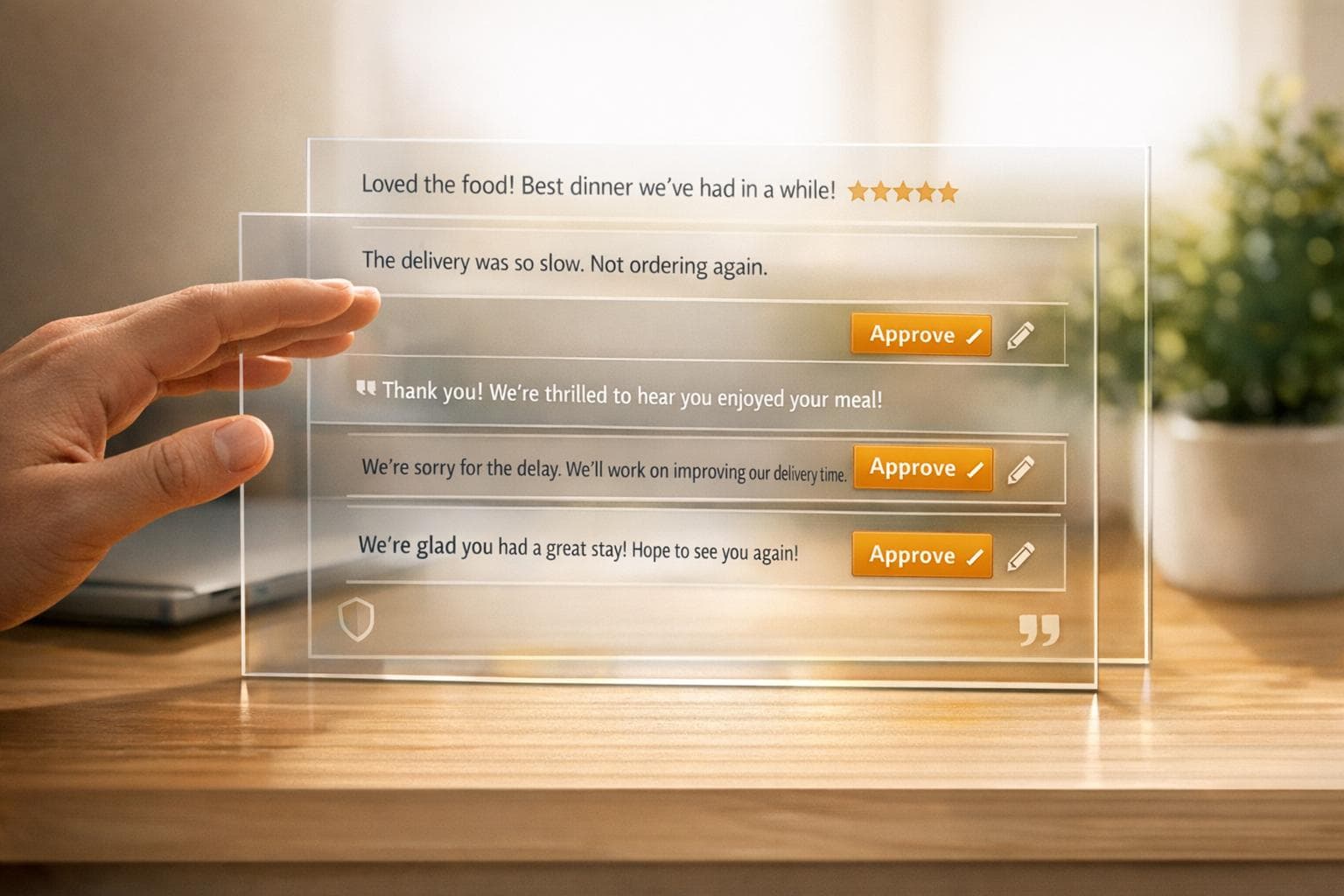
AI review response automation simplifies how businesses handle customer reviews across platforms like Google, Yelp, and Facebook. Here's why and how it matters:
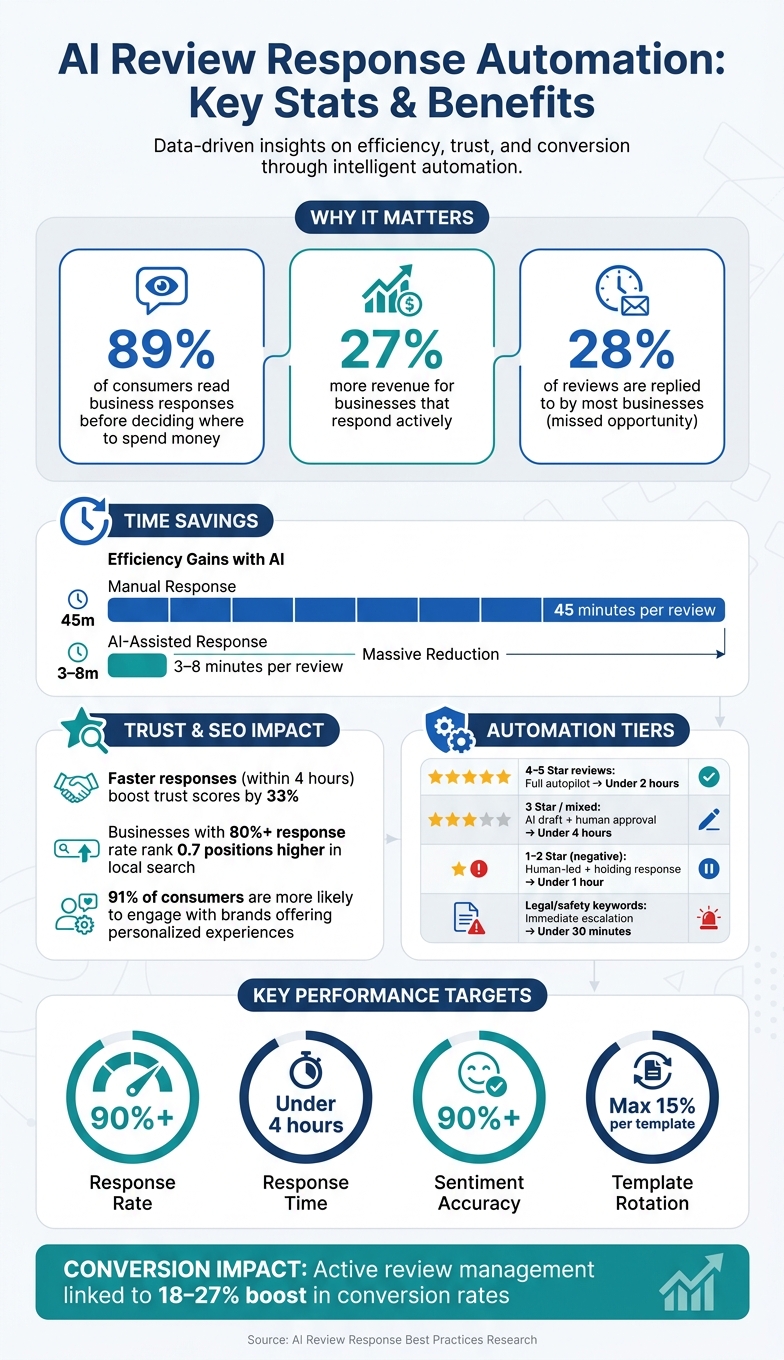
- Why It’s Important: 89% of consumers read business responses before deciding where to spend their money. Businesses that respond actively to reviews can see up to 27% more revenue. Yet, most businesses only reply to 28% of reviews.
- What It Does: AI tools draft, monitor, and publish replies to reviews, saving time and ensuring consistency. For example, manual responses take 45 minutes per review, while AI can cut this to 3–8 minutes.
- Benefits: Faster responses (within 4 hours) boost trust by 33%. Consistent tone across replies strengthens a brand's reputation. Automation also improves local SEO rankings, with businesses achieving an 80%+ response rate ranking higher in search results.
Key Steps to Implementing AI Review Automation:
- Set Goals: Target a 90%+ response rate and ensure 100% coverage for negative reviews.
- Define Brand Voice: Use clear, personalized language, avoiding robotic phrases like "We apologize for any inconvenience."
- Balance Automation & Human Oversight: Automate simple positive reviews but involve humans for mixed or negative feedback, especially those with legal or safety concerns.
- Monitor & Refine: Regularly audit responses, track performance metrics, and update templates to maintain quality.
By following these steps, businesses can efficiently manage reviews, enhance customer trust, and improve their online presence.
AI Review Response Automation: Key Stats & Benefits
Never Miss a Review Again - Smart AI Replies on Autopilot
sbb-itb-5375359
Defining Goals and Boundaries for Automation
Having clear goals and boundaries is crucial to avoid generic responses, emotional missteps, or potential legal risks. Let’s break down the three key decisions every business needs to make before diving into automation.
Setting Clear Objectives for Automation
Start by defining measurable targets. For instance, aim for a 90%+ response rate, ensure 100% coverage on negative reviews, and strive for at least 85% coverage on positive ones.
Begin with an audit of all review platforms - like Google, Yelp, and Facebook - to identify where your response gaps are largest. These gaps represent the areas where automation can deliver the quickest results. Fun fact: brands with an 80%+ response rate tend to rank 0.7 positions higher in local search results. So, improving your response rate isn’t just about customer service - it’s also a smart SEO move.
Establishing Brand Voice and Tone
Your AI needs to reflect your brand's personality. Define two or three key voice attributes - think professional, warm, or solution-focused - to guide how responses are crafted. Then, create a simple tone matrix to adjust the approach based on the review’s tone. For example, use enthusiastic and thankful language for five-star reviews, but adopt a more empathetic and measured tone when responding to complaints.
To keep things personal and avoid sounding robotic, build a "forbidden phrase" list. Skip generic openers like "We apologize for any inconvenience" or "Dear valued customer". Instead, encourage the AI to use the customer’s first name, reference the specific product or service they mentioned, and include details when a staff member is praised by name. Adding a personal signature (e.g., " - Sarah, Manager") can also make a big difference.
"Done wrong, [automation] turns into a stream of copy-paste replies that make your brand look like a robot in a suit." - Reviewshake
One practical tip: don’t use the same template more than three times per product per week. Rotating responses keeps your replies from feeling repetitive to customers who read multiple reviews.
Deciding What to Automate and When to Involve a Human
Not every review requires the same level of attention. Use a three-tier system to balance automation with human judgment:
| Review Type | Automation Level | Target Response Time |
|---|---|---|
| 4–5 Star (no complaints) | Full autopilot | Under 2 hours |
| 3 Star or mixed sentiment | AI draft + human approval | Under 4 hours |
| 1–2 Star (negative) | Human-led + holding response | Holding: under 1 hour |
| Legal/safety keywords | Immediate escalation | Under 30 minutes |
For negative reviews, automation can send an acknowledgment within an hour, but a human should step in for a personalized resolution within 24 hours. This method ensures fast responses without risking an inappropriate reply on sensitive issues.
Reviews with legal or safety keywords like "injury", "lawsuit", "attorney", "food poisoning," or "unsafe" should be flagged for immediate escalation. It’s critical that AI never makes legal promises, admits liability, or discusses refunds in public responses. To maintain quality, only allow full automation when the AI’s sentiment confidence score is above 85%. Anything below that should be routed to a human reviewer.
"AI review response is not about replacing human judgment. It is about handling the volume so human judgment can focus on the cases that need it." - Demand Signals
With these clear goals and boundaries in place, you're ready to create a system that’s both efficient and responsive.
Setting Up Your AI Review Response System
Once you've defined your objectives and boundaries, the next step is to establish an AI review response system that works efficiently behind the scenes. This system should handle a large volume of reviews while maintaining a high standard of quality.
Building Templates and Preparing Data for Consistency
To ensure your AI reflects your brand accurately, provide it with detailed context. Train the system using past review responses, customer service emails, and examples of your brand’s tone and style. Include essential business details like service offerings, staff names, operating hours, return policies, and location-based specifics. The more context you provide, the more precise and relevant the AI’s outputs will be.
Develop base templates for handling positive, neutral, and negative reviews. Each template should follow a simple three-step structure: start with a warm greeting or a note of gratitude, reference a specific detail from the review, and close with a friendly, forward-looking statement. To keep responses varied and engaging, create at least 10 different template versions for each automation rule.
Remember to follow U.S. conventions, such as using MM/DD/YYYY for dates, the dollar sign ($) for currency, and imperial units for measurements. These details convey professionalism and attention to detail.
Adjusting Responses by Rating and Platform
Different platforms and review ratings call for tailored responses. For instance, Google Business Profile reviews provide an opportunity to naturally include your business name and local keywords in responses to positive feedback, which can boost local SEO. For negative reviews on Google, avoid including keywords, as this could unintentionally amplify the visibility of complaints. For platforms like Yelp, Facebook, and TripAdvisor, adjust your tone to align with the platform's community norms.
Don’t ignore star-only reviews (those without written comments). A short, friendly response signals to search engines and potential customers that your business is attentive and engaged.
Setting Response Timing and Safety Limits
Before launching your system, establish safety measures to ensure reliability. Implement a response delay - such as 24 hours - giving your team time to review and intercept any unusual or potentially problematic content before it goes live. This delay acts as a safeguard against AI errors, such as referencing services you don’t provide.
Your safety checklist should ensure that AI-generated responses avoid public mentions of refunds, admissions of fault, blaming staff, or making legally binding statements. Also, double-check that no overlapping automation rules exist - for example, assigning conflicting rules to the same star rating on the same platform. A clear and organized rule structure helps maintain consistency and predictability.
Writing High-Quality AI Responses
Creating high-quality responses that align with your brand voice is essential for building genuine customer relationships. Personalization, tone, and clarity are the cornerstones of responses that inspire trust and engagement, rather than coming across as generic or insincere.
Personalizing Responses to Feel Genuine
When responding to reviews, referencing specific details makes all the difference. Use the customer’s name, mention the product or service they discussed, and, if they highlighted a team member, acknowledge that person directly. For instance, saying, “We’re thrilled that Mark provided excellent service during your installation” shows you’ve truly read and appreciated their feedback.
A helpful approach here is the "Mirror, then Move" technique. Begin by reflecting the customer’s emotion or concern to demonstrate understanding, then guide the conversation toward a resolution or a positive note. Tailor your tone to match the sentiment of the review, whether it’s enthusiastic or critical.
Avoid overused phrases like “valued customer” or “we apologize for any inconvenience.” These can sound robotic and impersonal. Instead, include even one specific, genuine detail - it can make a big impact. Research shows that 91% of consumers are more likely to engage with brands that deliver personalized experiences.
Finally, maintain a tone that balances empathy and professionalism to build trust.
Using Empathetic and Professional Language
When handling negative reviews, start by calmly acknowledging the issue with a single, sincere apology. The "One-Apology" Rule ensures your response stays composed and credible, avoiding over-apologizing, which can dilute your message.
Switch up your openings to avoid sounding repetitive. Phrases like “Thank you for your feedback” can feel as impersonal as a generic call center message. As ReviewGen.AI aptly put it:
"'Thank you for your feedback' is the review response equivalent of 'your call is important to us.'"
- ReviewGen.AI
Instead, begin with something specific from the review. This immediately establishes a more authentic and human tone, setting the stage for a productive response.
From here, guide the conversation by including actionable next steps.
Including Clear Next Steps
Every response should end with a clear and actionable step. For positive reviews, this could be an invitation to return, try a new product, or share their experience further, like a photo. For complaints, redirect the conversation to a private channel by providing a specific contact, such as a name and phone number.
Avoid vague directives like “please contact customer service” - this can feel dismissive and leave the customer unsure about what to do next. Instead, offer a direct point of contact and sign off with a real person’s name or initials and title, such as “ - Sarah, Store Manager”. This small touch adds an extra layer of authenticity that generic sign-offs can’t match.
Monitoring and Improving Automation Over Time
Keeping a close eye on your AI systems is just as important as setting them up properly in the first place. Even the best-configured automation can veer off course without regular oversight. Customer expectations evolve, your brand adapts, and AI systems can develop quirks - like overusing certain templates or misreading sarcasm. A steady review process ensures your automation stays on track and minimizes potential issues. Here’s how you can audit, track, and refine your system over time.
Auditing Responses for Quality Control
A weekly review of 20–50 randomly chosen automated responses is a great starting point for maintaining quality. During these audits, check that the AI sticks to your brand’s tone, interprets customer sentiment correctly, and avoids overusing the same templates. Ideally, no single template should account for more than 15% of your total responses - anything more can feel impersonal and robotic to customers.
Review escalation logs regularly as well. This helps you catch instances where the AI either responded when it shouldn’t have or failed to flag sensitive reviews for human attention.
Another common issue to watch for is AI "hallucinations" - where the system invents details, like thanking a customer for a service or feature your business doesn’t even offer. Spotting and correcting these errors quickly protects your credibility.
Tracking Key Metrics and Insights
Monitoring key metrics gives you a clear picture of how well your automation is performing. Tools like CommentAssist can help you track response rates, response times, and sentiment trends all in one place. High-performing businesses often aim for the following targets:
| Metric | Target | Why It Matters |
|---|---|---|
| Response Rate | 90%+ | Improves local SEO rankings and builds trust |
| Response Time | Under 4 hours | Faster replies can boost trust scores by 33% |
| Sentiment Accuracy | 90%+ | Reduces the risk of tone-deaf responses |
| Template Rotation | Under 15% per template | Prevents a repetitive, robotic tone |
Source:
Beyond these metrics, pay attention to recurring themes in negative reviews. If the same issues - like slow service or unclear return policies - keep coming up, they might point to deeper operational problems, not just reputation concerns.
Once you’ve analyzed these metrics, use the insights to tweak your templates and fine-tune your automation rules.
Updating Templates and Automation Rules
Your performance data should guide how you update templates and rules. For example, try running A/B tests on 2–3 new response variations each month. Track which ones perform better in terms of engagement, and phase out the weaker options. Over time, you can also create a "Sentiment Map" using sentiment analysis. This map highlights recurring negative feedback, helping you adjust not just your responses but also your broader business practices.
Expand the scope of your automation only when the AI demonstrates consistent accuracy. For instance, you might allow auto-posting in categories that previously required human approval. However, as Anya Vitko from Vendasta wisely notes:
"AI is a powerful engine, but it needs a driver. Moving to full automation without oversight can lead to critical risks that could tank your reputation."
Finally, always keep strict escalation rules in place for sensitive reviews. Keywords like "injury", "lawsuit", or "refund" should trigger immediate human intervention. This ensures that serious issues are handled with the care they deserve.
Conclusion: Launching Your AI Review Response System
Setting up an effective AI review response system takes careful planning, consistent monitoring, and regular fine-tuning. Companies that achieve results - like the 18–27% boost in conversion rates linked to active review management - understand that automation is a continuous process, not a one-time setup. The goal is to strike a balance between streamlining operations and maintaining personalized interactions, a theme we've emphasized throughout this guide.
Finding the right mix of automation and human oversight is key. Tools such as CommentAssist combine AI-driven responses, cross-platform monitoring, and analytics, allowing your team to focus on reviews that truly require a personal touch.
Before you launch, use the checklist below to ensure nothing important has been overlooked.
Final Checklist Before You Go Live
Double-check these critical elements to ensure a smooth launch:
| Check | What to Verify |
|---|---|
| Platform audit | Confirm all review platforms are connected (e.g., Google Business Profile, Yelp, Facebook, and any industry-specific directories). |
| Brand voice rules | Make sure tone guidelines, restricted phrases, and preferred sentence styles are clearly documented. |
| Escalation triggers | Set up alerts for keywords like "injury", "legal issues", or "refund" to ensure these reviews are flagged for immediate human attention. |
| Automation levels | Automate responses for 5-star reviews without text, but require human approval for negative reviews. |
| Safety guardrails | Verify that no responses include legal guarantees, admissions of liability, or private customer information. |
| Template variety | Prepare 40–50 response templates, ensuring no single template is used for more than 15% of replies. |
| Gradual rollout plan | Start with positive reviews on one platform and review every response for the first two weeks to ensure accuracy. |
Begin with a limited rollout: focus on positive reviews, conduct quick human reviews (around 30 seconds per response), and expand gradually as confidence in the system grows. By taking these steps, you’ll set the stage for a system that enhances customer engagement while staying aligned with your brand’s values.
FAQs
Which reviews should I automate vs. route to a human?
Automating responses can save time and ensure consistency for routine or repetitive reviews. These might include generic praise or straightforward feedback that doesn't call for a personalized touch. However, when reviews highlight complex issues, negative experiences, or specific customer concerns, it's crucial to involve a human. A thoughtful, tailored reply in these cases helps maintain professionalism, address the customer's needs effectively, and uphold a consistent brand voice while prioritizing customer satisfaction.
What guardrails prevent AI from creating legal or safety risks?
AI guardrails play a crucial role in managing legal and safety risks. They enforce compliance through workflows like logging, access control, and risk flags, which help maintain accountability and oversight. On the technical side, measures such as structured validation and content filtering are implemented to block harmful outputs and minimize errors in AI models. Together, these safeguards ensure that AI systems operate responsibly and stay aligned with both regulatory requirements and internal standards.
How can I measure if AI review responses are boosting SEO and trust?
To gauge the effectiveness of your strategies, focus on tracking key metrics that reflect both SEO performance and trust-building initiatives. Start by monitoring your local search rankings and overall visibility - these are strong indicators of SEO progress.
When it comes to trust-building, keep an eye on metrics like response rates, response times, and the overall sentiment of reviews. These factors reveal how well you're engaging with your audience and addressing their concerns.
Dive deeper into data by analyzing shifts in review ratings, customer feedback, and engagement levels over time. Additionally, leverage analytics tools to measure how automated responses are influencing review volume, response speed, and your overall reputation. This ensures that automation is having a positive impact on both SEO and customer trust.