
Responding to reviews quickly can transform your business. Here's why:
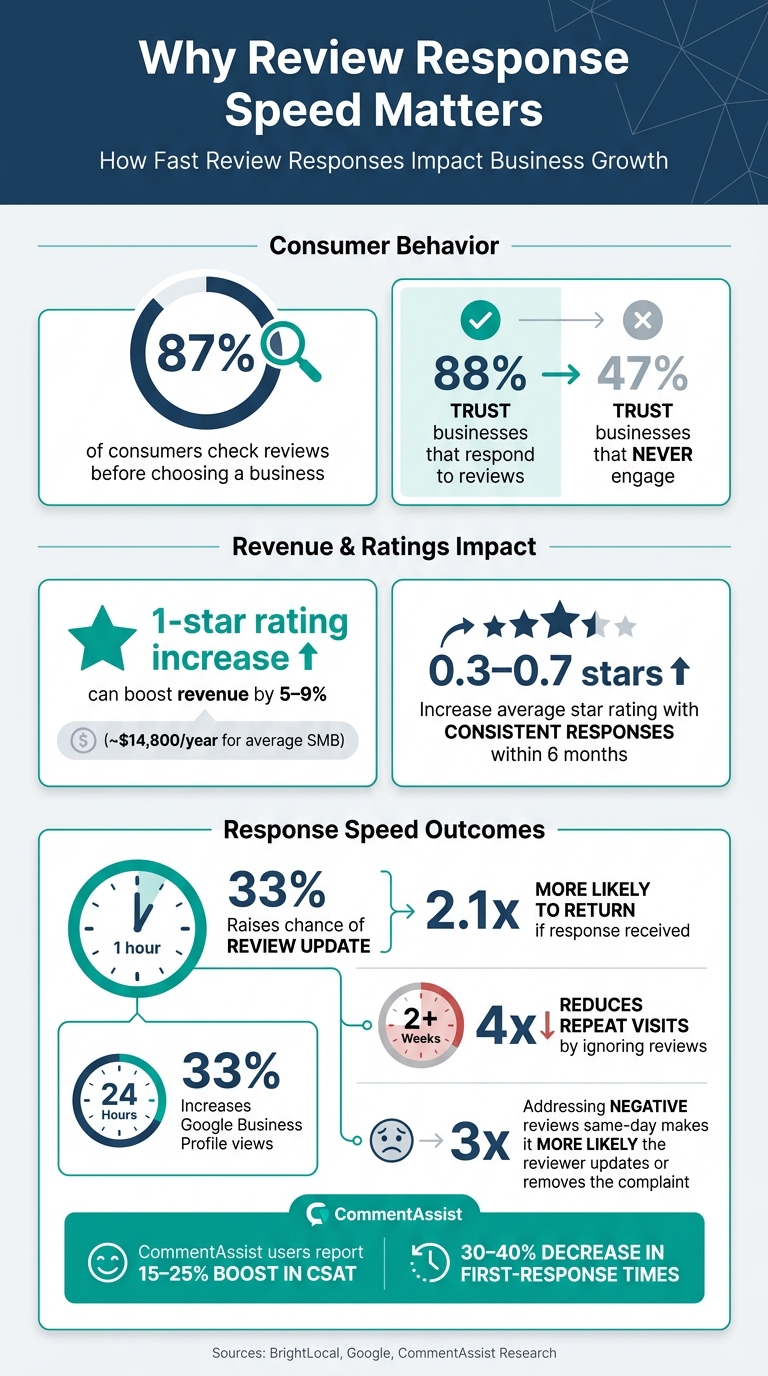
- 87% of consumers check reviews before choosing a business.
- A 1-star rating increase can boost revenue by 5–9%, or $14,800 annually for the average SMB.
- Responding to negative reviews within 1 hour raises the chance of an update by 33%.
Real-time notifications alert you the moment a customer leaves feedback. This allows you to respond faster, build trust, and improve visibility on platforms like Google and Yelp. Tools like CommentAssist simplify this process by centralizing reviews, automating responses, and tracking response time analytics.
If you want to improve customer satisfaction and grow your business, real-time notifications and fast responses are the way forward.
How Fast Review Responses Impact Business Growth
Benefits of Faster Review Responses for Businesses
Building Customer Trust and Loyalty
Responding quickly to reviews shows customers that their opinions matter, and that simple gesture can make a huge difference. In fact, 88% of consumers trust businesses that actively respond to reviews - both positive and negative - compared to just 47% who trust businesses that never engage.
Speed plays a critical role here. Customers are 2.1 times more likely to return if they get a response within an hour. On the flip side, leaving reviews unanswered for over two weeks can reduce the likelihood of a repeat visit by four times.
"The gap between consumer expectation and business response creates a measurable trust deficit." - Garrett Mullins, Tech Strategist, US Tech Automations
Boosting Online Visibility
Quick responses don’t just build trust - they can also improve your online presence. Platforms like Google and Meta reward engagement, meaning businesses that respond quickly can outrank competitors, even those with higher star ratings. For instance, responding within 24 hours can increase Google Business Profile views by as much as 33%. Features like Google's "Ask Maps" and Meta's AI sentiment summaries further emphasize the importance of staying responsive.
Preventing Negative Feedback from Escalating
Ignoring negative reviews can make a bad situation worse. A timely response, however, can completely change the narrative.
Research shows that addressing complaints quickly and focusing on a resolution can reshape customer perceptions. To make the most of your review management efforts, it’s helpful to follow specific response time targets:
| Review Type | Response Time Target | Response Approach |
|---|---|---|
| 1-star negative | Within 30 minutes | Acknowledge + empathy + move resolution offline |
| 2-star negative | Within 1 hour | Apologize + take responsibility + offer resolution |
| 3-star neutral | Within 2 hours | Acknowledge + ask for details + offer to improve |
| 4/5-star positive | Within 4 hours | Thank + specific acknowledgment + invite to return |
Consistently responding to reviews can even increase your average rating by 0.3 to 0.7 stars within six months. This turns review management into more than just damage control - it becomes a strategy for growth. Quick, thoughtful responses not only protect your reputation but also create opportunities to strengthen it.
sbb-itb-5375359
Get Review Alerts in Slack super easily in 2mn
How Google Business Profile Notifications Work
Google Business Profile (GBP) includes built-in notification tools that let you know as soon as a customer leaves a review. However, your profile must be verified to reply to reviews. Unverified profiles can still receive alerts but won’t have the option to respond.
Enabling Review Notifications
You can enable review alerts through either Google Search or the Google Maps app.
Using Google Search:
- Open your Business Profile on Google.
- Tap the three-dot menu labeled More, then select Notifications.
- Locate Customer activity and toggle it on.
Using the Google Maps app:
- Open the Maps app and tap Business at the bottom right.
- Tap Notifications at the top right to adjust your alert preferences.
Once activated, alerts are delivered in real time via email, Google Search, and the Maps app. If your business operates across multiple locations, you can integrate the Business Profile API with Google Cloud Pub/Sub. This setup allows notifications, like NEW_REVIEW or UPDATED_REVIEW, to go directly into your systems.
After enabling alerts, you can refine your notification settings to focus specifically on managing customer reviews.
Customizing Notification Settings
With notifications turned on, you can customize them to make your review management process more efficient. GBP allows you to filter alerts by category. For example, if your priority is responding to reviews, you can enable Customer activity alerts while muting notifications for account updates or feature announcements.
When you reply to a review, Google delays sending the customer an email notification by 5 minutes. This delay gives you a brief window to correct any typos or adjust the tone of your response before the customer is notified.
"The business's response is published immediately and 5 minutes later, the notification is sent. This 5 minute delay allows time for the merchant to make any corrections to their response after submitting." - Google Community Forum
To keep your alerts organized, consider removing old or unverified business claims from your profile.
Using CommentAssist for Automated Real-Time Monitoring
Traditional review notifications are a solid foundation for managing customer feedback, but automation takes it to the next level. Tools like CommentAssist simplify real-time review monitoring, ensuring no feedback slips through the cracks. Instead of juggling multiple platforms and manually drafting responses, CommentAssist streamlines the entire process.
AI-Powered Review Responses
When a review is posted, CommentAssist steps in with AI technology to analyze the review's sentiment and generate a polished, ready-to-post response in seconds. Whether it’s a complaint needing empathy or praise deserving warmth, the AI drafts a reply that matches the tone perfectly. You can post it as-is or tweak it quickly before hitting send.
Quick, thoughtful responses can significantly boost customer satisfaction. By removing the guesswork of crafting replies, CommentAssist helps you maintain fast response times and protect your reputation.
"The AI-generated replies have helped me stay consistent with replying to every review." - Priya Mehta, Operations Head, Blossom Skin Studio
Centralized Review Management
CommentAssist consolidates reviews from platforms like Google, Yelp, Facebook, TripAdvisor, and over 50 others into a single, easy-to-navigate dashboard. Instead of hopping between tabs, you can view all reviews, pending responses, and flagged items in one place.
The tool also allows you to filter reviews by location, rating, or sentiment. Alerts can be routed directly to specific team members, which is especially handy for businesses with multiple locations. Companies using this feature report a 48% faster response rate and a 90% drop in missed reviews within just one month.
Custom Templates for Consistent Branding
When multiple team members handle review responses, maintaining a consistent tone can be a challenge. CommentAssist solves this by offering custom response templates tailored to your brand’s voice. Templates can vary by review type - for instance, a 5-star review might get a different reply than a 2-star complaint. You can even set keyword triggers for high-priority terms like "refund" or "delayed", ensuring critical reviews are addressed immediately.
This feature keeps your responses on-brand and efficient, making it easier to manage reviews while presenting a unified voice to your audience.
Measuring Impact with Response Time Analytics
Understanding how fast you respond is one thing. Knowing how it affects your business is another. Tracking response time analytics helps turn what might feel like guesswork into a clear, measurable strategy.
Key Response Time Metrics to Track
Start with your average response time. Many businesses still average over 5 days, but responding within 24 hours can give you a major advantage. A quick response not only improves customer satisfaction but also boosts your online visibility.
Another crucial metric is your response rate, which shows the percentage of reviews you reply to. A high response rate signals to both customers and search engines that your business is engaged and attentive. Handling negative reviews quickly is just as important. For 1- and 2-star reviews, aim to respond within 4 hours. Addressing negative feedback the same day makes it 3x more likely that the reviewer will update or remove their complaint.
| Response Time | Avg. Local Pack Position | Customer Satisfaction |
|---|---|---|
| Within 1 hour | 2.5 | Highest |
| Within 24 hours | 2.8 | High |
| 24–48 hours | 3.2 | Moderate |
| 2–7 days | 3.9 | Low |
| 7+ days | 4.4 | Very low |
| Never | 5.1 | N/A |
(Source:)
These metrics lay the groundwork for using advanced tools to refine your strategy.
Using CommentAssist Analytics Tools
With the right tools, these insights can drive real change. CommentAssist offers an analytics dashboard that turns data into actionable improvements. It tracks average response time, response rates, and sentiment trends - all in one place.
For businesses with multiple locations, CommentAssist lets you compare performance by branch, making it easy to spot locations that might need extra support. It also tracks recovery rates, showing how often negative reviews are updated or removed after a professional, timely response.
Users of CommentAssist report a 15%-25% boost in customer satisfaction (CSAT) and a 30%-40% decrease in first-response times. These results aren’t just felt - they’re measurable, visible, and directly linked to your business's success.
Conclusion: Taking Control of Your Online Reputation
Your online reputation shifts with every review you respond to - or ignore. As mentioned earlier, engaging with all reviews can significantly build consumer trust.
Real-time notifications help bridge the gap between when a customer leaves feedback and when your business takes action. Responding quickly not only improves the chances of resolving negative experiences but also gives you an edge in managing your reputation. Technology plays a key role here. Efficient responses don’t have to mean extra work. Tools like CommentAssist use AI to streamline review management, cutting the time spent from 4.3 hours to just 0.4 hours per week, while maintaining personal, consistent replies. And with pricing starting at $29/month, it’s a practical solution for businesses of all sizes.
Whether it’s real-time alerts or automated responses, every step you take strengthens your online presence.
"Instant alerts help reduce negative public reviews by 23%." - Zendesk Experience Study
The businesses excelling in reputation management aren’t necessarily the ones with the largest number of reviews. They’re the ones that consistently engage, respond quickly, and use smart tools to maintain their online presence. By adopting these strategies, you’re setting a solid foundation for long-term online success. Take charge of your reputation today with real-time notifications and AI-powered tools.
FAQs
What’s the ideal response time for each star rating?
When it comes to responding to reviews, timing is everything. Research reveals that 33% of customers expect a response within just 3 days, and a larger group - 53% - anticipates a reply within 7 days. However, aiming to respond even faster, ideally within 24 hours, can go a long way in building trust and improving customer engagement. Quick responses show that you value feedback, helping to maintain a strong and positive online reputation.
How do I turn on Google review notifications?
To stay on top of your Google reviews, you can set up real-time alerts to notify you whenever a new review is posted. Here's how to do it using your review management platform:
- Navigate to the notification settings in your platform.
- Set up a rule specifically for Google reviews.
- Choose how you'd like to receive alerts - via email, SMS, or in-app notifications.
- Save your changes to activate the alerts.
For added convenience, tools like CommentAssist can automate these notifications, ensuring you're always updated without delay.
How can CommentAssist help me respond faster to reviews?
CommentAssist helps speed up review responses using AI-driven tools that simplify the process, allowing you to reply both quickly and efficiently. With features like automated responses, detailed analytics, and actionable insights, it makes managing reviews easier. This ensures your team can respond to feedback promptly and maintain a strong online reputation.